![[Contents]](TOC.GIF)
![[Prev. Chapter]](REW.GIF)

![[Next Section]](NEXT.GIF)
![[Next Chapter]](FF.GIF)
![[Index]](INDEX.GIF)
![[Help]](HELP.GIF)
This chapter describes some common Available Server and Production Server hardware configurations. For the Available Server configurations, figures containing generic devices are shown first, and then figures with actual devices are shown. For the Production Server configurations, most of the figures contain generic devices. See Chapter 4 for information about connecting devices to a shared SCSI bus and preparing systems and storage shelves.
This section describes some common Available Server hardware configurations.
![[Prev. Section]](PREV.GIF)
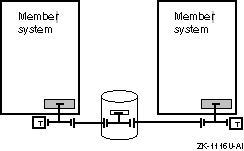
Figure 6-1 shows a minimum Available Server hardware configuration consisting of two systems, one storage shelf, and one shared SCSI bus.
The following sections provide detailed examples of two-system, one-bus configurations.
In the configuration shown in Figure 6-2, the SCSI controllers and the storage shelf are single-ended, narrow devices. There is one single-ended bus between the two terminated Y cables.
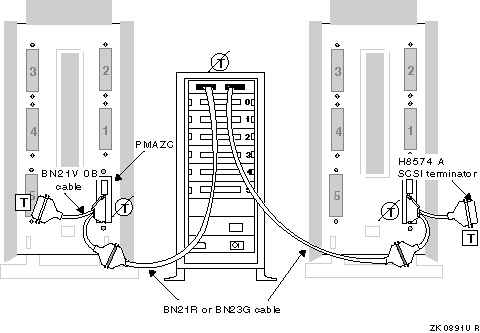
To create the configuration in Figure 6-2, you need the following hardware:
| Hardware | Description | Configuration Information |
| Systems | Two DEC 3000 Model 500s | Set the PMAZC SCSI IDs to 6 and 7. |
| SCSI Controllers | Two PMAZC | Remove port A's termination; keep port B terminated. |
| Storage | BA350 with six disks | Remove the termination and install disks in slots 0 to 5. |
| Cables | Two BN21V-0Bs (Y) | Attach to the PMAZCs. |
| Two BN21Rs or BN23Gs | Connect the Y cables and BA350. | |
| Terminators | Two H8574-As | Attach to the Y cables. |
If you have the same devices as in Figure 6-2, you can create an alternative configuration by putting the BA350 storage shelf at the end of the shared bus. If you use this configuration, keep the internal termination in the BA350 storage shelf to terminate the bus, and use a BC19J cable to connect the two systems.
If you want two BA350 storage shelves in your configuration, use a BN21H or BN21J cable to connect the shelves, as shown in Figure 6-3.
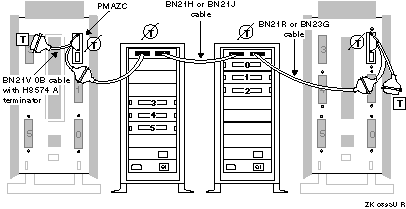
Figure 6-4 shows a configuration consisting of two types of single-ended SCSI controllers and one single-ended storage shelf. This configuration uses a DEC 7000 system, which uses KZMSA XMI-to-SCSI bus adapters. You must use a DWZZA-AA with the KZMSA because the KZMSA does not have removable termination. Therefore, to provide a differential bus for all devices, you must connect SCSI signal converters to each of the single-ended devices.
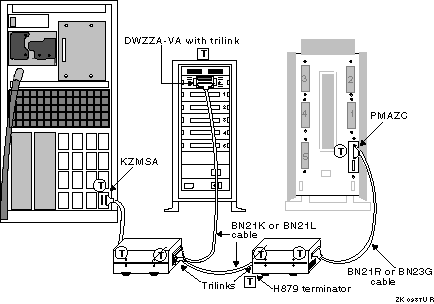
To create the configuration in Figure 6-4, you need the following hardware:
| Hardware | Description | Configuration Information |
| Systems | One DEC 3000 Model 500 | Set the PMAZC SCSI ID to 7. |
| One DEC 7000 | Set the KZMSA SCSI ID to 6. | |
| SCSI Controllers | One PMAZC and one KZMSA | Terminate both PMAZC ports. |
| Storage | BA350 with five disks | Terminate the storage shelf and install disks in slots 1 to 5. |
| Signal Converters | Two DWZZA-AAs and one DWZZA-VA | Keep the termination in the single-ended side, and remove the termination from the differential side. |
| Connectors | Three H885 trilinks | Attach to the differential side of the DWZZAs. |
| Cables | Two BN21Rs or BN23Gs | Connect the PMAZC and KZMSA to the DWZZAs. |
| Two BN21Ks or BN21Ls | Connect the trilinks. | |
| Terminators | Two H879-AAs | Attach to the trilinks at the ends of the bus. |
Figure 6-5 shows a configuration consisting of two systems and one HSZ40 DEC RAID controller, all differential devices. There is one shared differential SCSI bus between the terminated H885 trilink connector and terminated BN21W-0B Y cable.
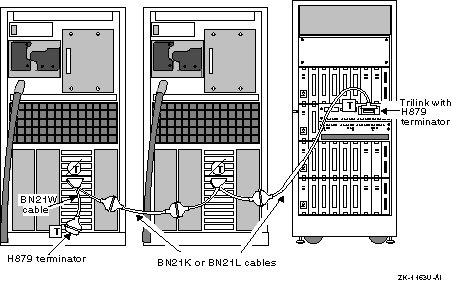
To create the configuration in Figure 6-5, you need the following hardware:
| Hardware | Description | Configuration Information |
| Systems | Two AlphaServer 8200s | Set the KZPSAs SCSI IDs to 6 and 7. |
| SCSI Controllers | Two KZPSAs | Remove the termination. |
| Storage | HSZ40 | N/A |
| Connectors | One H885 trilink | Attach to the HSZ40. |
| Cables | Two BN21W-0Bs (Y) | Attach to the KZPSAs. |
| Two BN21Ks or BN21Ls | Connect the Y cables and trilink. | |
| Terminators | Two H879-AAs | Attach to the Y cable and trilink at the ends of the bus. |
Figure 6-6 shows a configuration with two systems with KZPSA differential SCSI adapters and one single-ended storage shelf with an installed DWZZA-VA SCSI signal converter.
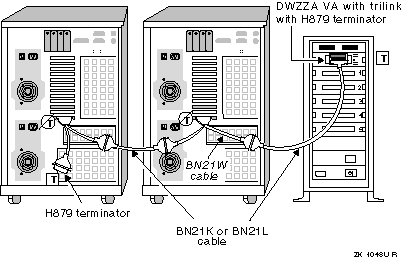
To create the configuration in Figure 6-6, you need the following hardware:
| Hardware | Description | Configuration Information |
| Systems | Two AlphaServer 2100s | Set the KZPSAs SCSI IDs to 6 and 7. |
| SCSI Controllers | Two KZPSAs | Remove the termination. |
| Storage | BA350 with five disks | Terminate the storage shelf and install the disks in slots 1 to 5. |
| Signal Converters | One DWZZA-VA | Terminate the single-ended side, and remove the termination from the differential side. |
| Connectors | One H885 trilink | Attach to the DWZZA-VA. |
| Cables | Two BN21W-0Bs (Y) | Attach to the KZPSAs. |
| Two BN21Ks or BN21Ls | Connect the Y cables and trilink. | |
| Terminators | Two H879-AAs | Attach to the trilink and Y cable at the ends of the bus. |
Figure 6-7 shows a configuration consisting of two systems with single-ended SCSI controllers connected to SCSI signal converters and one differential storage shelf.
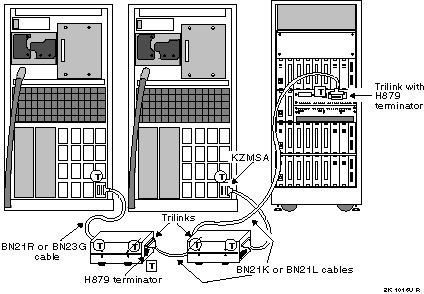
To create the configuration in Figure 6-7, you need the following hardware:
| Hardware | Description | Configuration Information |
| Systems | Two DEC 7000s | Set the KZMSAs SCSI IDs to 6 and 7. |
| SCSI controllers | Two KZMSAs | N/A |
| Storage | HSZ40 RAID subsystem | N/A |
| Signal Converters | Two DWZZA-AAs | Terminate the single-ended side, and remove the termination from the differential side. |
| Connectors | Three H885 trilinks | Attach to the differential side of the DWZZA-AAs and to the HSZ40. |
| Cables | Two BN21Rs or BN23Gs | Connect the KZMSAs to the single-ended side of the DWZZA-AAs. |
| Two BN21Ks or BN21Ls | Connect the trilinks. | |
| Terminators | Two H879-AAs | Attach to the trilinks at the ends of the bus. |
Figure 6-8 shows two AlphaServer 8200 systems in an Available Server configuration with two HSZ70 DEC RAID controllers. Note that the SCSI bus adapters are KZPSA PCI-to-SCSI adapters. In this figure, the HSZ70s are on the end of the shared SCSI bus.
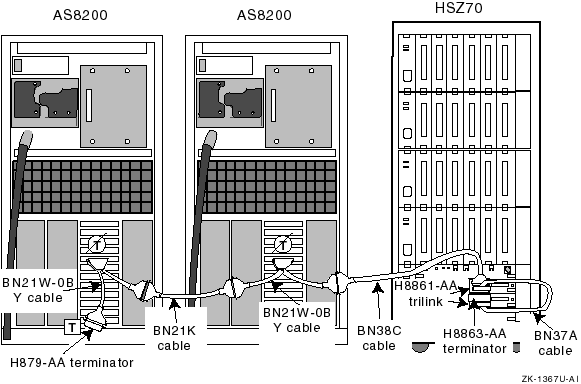
To create the configuration in Figure 6-8, you need the following hardware:
| Hardware | Description | Configuration Information |
| Systems | Two DEC 8200s | Set the KZPSAs SCSI IDs to 6 and 7. |
| SCSI controllers | Two, which may be KZPSAs | Remove the KZPSA onboard SCSI termination resistor SIPs. |
| Storage | HSZ70 DEC RAID subsystem with two controllers | N/A |
| Connectors | Two H8861-AA VHDCI trilink connectors | Attach to the HSZ70 controller port connectors. |
| Cables | Two BN21W-0B Y cables | Install on KZPSA SCSI controller. |
| One BN38C | Install between one of the BN21W-0B Y cables and an H8861-AA VHDCI trilink connector. | |
| One BN21K or BN21L | Install between BN21W-0B Y cables. | |
| Cables | One BN37A | Install between the H8861-AA trilinks. |
| One H8863-AA VHDCI differential terminator | Attach to the H8861-AA open connector. | |
| Terminators | One H879-AA | Attach to the BN21W-0B Y cable with a free connector. |
Figure 6-9 shows a figure with two AlphaServer 8200 systems in an Available Server configuration with two HSZ70 DEC RAID controllers in the middle of a shared SCSI bus.
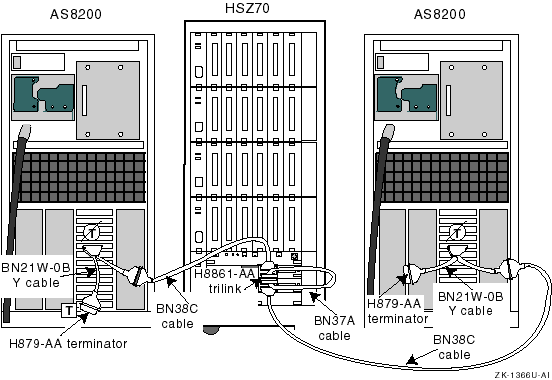
To create the configuration in Figure 6-9, you need the following hardware:
| Hardware | Description | Configuration Information |
| Systems | Two DEC 8200s | Set the KZPSAs SCSI IDs to 6 and 7. |
| SCSI controllers | KZPSAs | Remove the KZPSA onboard SCSI termination resistor SIPs. |
| Storage | HSZ70 DEC RAID subsystem with two controllers | N/A |
| Connectors | Two H8861-AA VHDCI trilink connectors | Attach to the HSZ70 contoller port connectors. |
| Cables | Two BN21W-0B Y cables | Install on KZPSA SCSI controller. |
| Two BN38C | Install between BN21W-0B Y cables and an H8861-AA VHDCI trilink connector. | |
| One BN37A | Install between the H8861-AA trilinks. | |
| Terminators | Two H879-AAs | Attach to the BN21W-0B Y cables at the ends of the bus. |
More complicated Available Server hardware configurations involve two shared buses. DIGITAL recommends that you set up one bus at a time to avoid confusion.
Figure 6-10 shows an ASE with two systems, two shared buses, and a storage shelf on each bus.
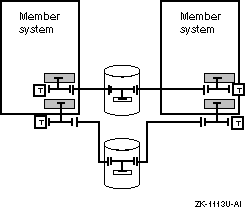
Figure 6-11 shows a detailed two-bus configuration that includes two single-ended systems and storage shelves, which are connected to two single-ended buses. The bus formed from the PMAZC modules' port B is shaded to differentiate it from the bus formed from port A.
To create the configuration shown in Figure 6-11, you need the following hardware:
| Hardware | Description | Configuration Information |
| Systems | Two DEC 3000 Model 500s | Set the PMAZCs SCSI IDs to 6 and 7. |
| SCSI Controllers | Two PMAZCs | Remove PMAZC internal termination. |
| Storage | Two BA350s with six disks each | Remove the termination and install disks in slots 0 to 5. |
| Cables | Four BN21V-0B Y cables | Attach to PMAZCs. |
| Four BN21Rs or BN23Gs | Connect the Y cables and BA350s. | |
| Terminators | Four H8574-As | Attach to the Y cables. |
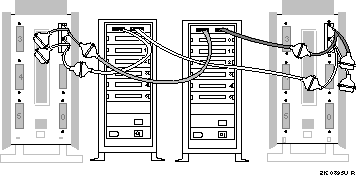
Figure 6-12 shows a more complicated two-bus configuration. This configuration includes two DEC 7000 systems, two BA350 storage shelves, one at the end of each bus, and six DWZZA-AA signal converters, connected to two shared buses. Attach terminators to the trilink connectors at each end of each differential bus to terminate the differential shared SCSI buses. The shared bus connected to KZMSA channel 1 is shaded to differentiate it from the bus connected to KZMSA channel 0.
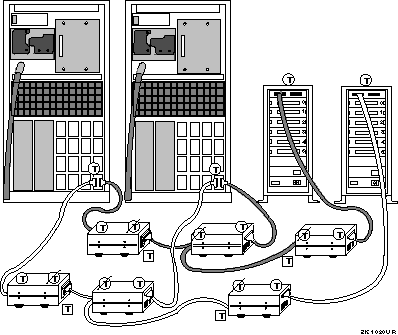
To create the configuration shown in Figure 6-12, you need the following hardware:
| Hardware | Description | Configuration Information |
| Systems | Two DEC 7000s | Set the KZMSAs SCSI IDs to 6 and 7. |
| SCSI Controllers | Two KZMSAs | N/A |
| Storage | Two BA350s with six disks each | Terminate the storage shelves and install disks in slots 0 to 5. |
| Signal Converters | Six DWZZAs | Terminate the single-ended side, and remove the termination from the differential side. |
| Connectors | Six H885 trilinks | Attach to the DWZZAs. |
| Cables | Six BN21Rs or BN23Gs | Connect the KZMSAs and BA350s to the single-ended side of the DWZZAs. |
| Four BN21Ks or BN21Ls | Connect the trilinks. | |
| Terminators | Four H879-AAs | Attach to the trilinks on the DWZZAs at the ends of the differential bus. |
Figure 6-13 shows an Available Server configuration with three systems, two shared buses, and storage on each bus.
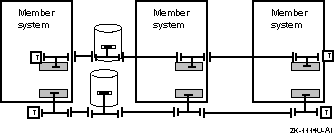
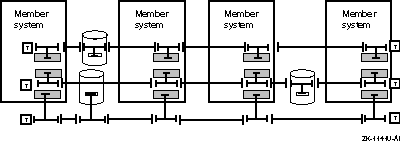
Figure 6-14 shows an Available Server configuration with four systems, three shared buses, and a storage shelf on each bus.
This section describes some common Production Server hardware configurations. It does not describe all the possible configurations. You can set up any configuration that adheres to the hardware listed in Chapter 2 and the configuration requirements described in Chapter 4.
Most of the figures in this section use generic devices and other components, such as cables and terminators. To set up your configuration, replace a generic device or component with one listed in Chapter 2.
For example, you can replace a member system with any supported system that has the necessary number of peripheral component interconnect (PCI) slots. Because member systems have different numbers of PCI slots, not all systems can be used in every configuration. You can replace a shared storage shelf with an HSZ40 controller or with a BA350 storage shelf that is connected to a SCSI signal converter.
Except for Figure 6-15, the sample configurations in this chapter show redundant MEMORY CHANNEL interconnects and two shared SCSI buses in each available server environment (ASE).
Figure 6-15 shows the parts of a Production Server hardware configuration.
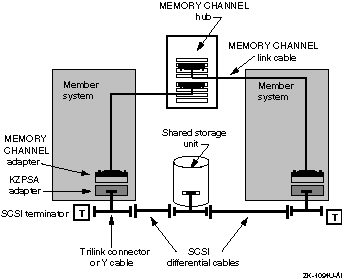
Figure 6-15 shows the following:
Member systems--You can use any combination of member systems listed in Chapter 2. Member systems have different numbers of PCI slots.
KZPSA adapters--Install KZPSA PCI-to-SCSI adapters in PCI slots to provide member system connections to shared SCSI buses.
Shared storage shelves--Use any combination of storage shelves listed in Chapter 2. If you have a single-ended storage shelf, such as a BA350, you must connect it to a SCSI signal converter.
Trilink connectors or Y cables--Use trilink connectors and Y cables to connect KZPSA SCSI adapters, DEC RAID controllers, or SCSI signal converters installed in single-ended storage shelves to shared SCSI buses.
SCSI differential cables--Use the appropriate cables to connect the trilink connectors and Y cables attached to member systems and storage shelves.
SCSI terminators--Terminate both ends of each shared SCSI bus.
MEMORY CHANNEL adapters--Install MEMORY CHANNEL adapters in PCI slots to connect systems to the cluster interconnects.
MEMORY CHANNEL hub--A MEMORY CHANNEL hub is required if you have more than two member systems. You can install up to eight line cards in a hub.
MEMORY CHANNEL link cables--Use a MEMORY CHANNEL link cable to connect a MEMORY CHANNEL adapter to another adapter, or to connect an adapter to a line card installed in a hub.
The following sections show some common Production Server hardware configurations.
Figure 6-16 shows a Production Server hardware configuration that includes two member systems, two terminated shared SCSI buses, and redundant MEMORY CHANNEL interconnects in a virtual hub configuration (there is no MEMORY CHANNEL hub).
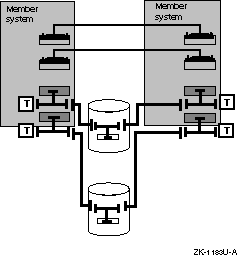
Figure 6-17 shows an actual example of the previous configuration using the following hardware:
Two AlphaServer 2100A systems with KZPSA adapters and H885 trilink connectors
Two BA350 storage shelves with installed DWZZA-VA signal converters and trilink connectors attached to the signal converters
Two shared SCSI buses consisting of BN21K or BN21L cables that are connected to the trilink connectors and terminated with H879-AA terminators
Redundant MEMORY CHANNEL adapters connected by MEMORY CHANNEL link cables to form the MEMORY CHANNEL interconnects
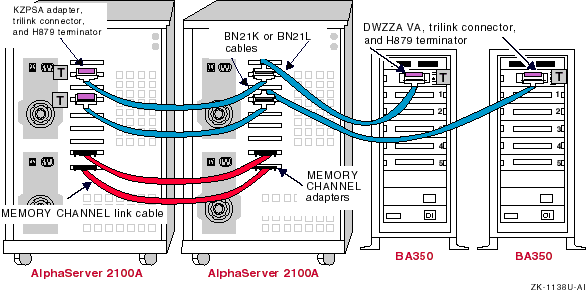
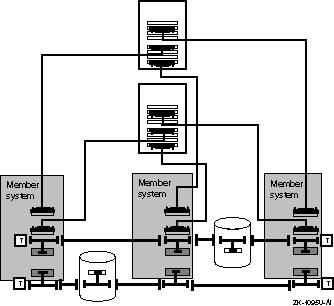
Figure 6-18 shows a Production Server hardware configuration that includes three member systems, two terminated shared SCSI buses, and redundant MEMORY CHANNEL interconnects in a standard hub configuration (it uses MEMORY CHANNEL hubs). Because this configuration requires four PCI slots, it is not supported on AlphaServer 2000 or 2100 systems.
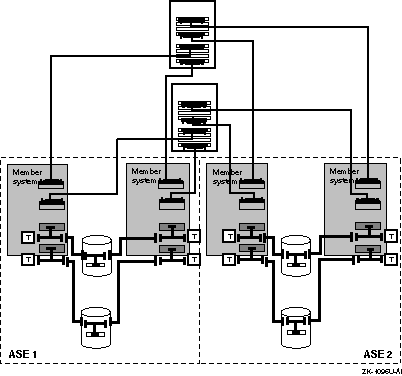
A four-system hardware configuration can include either one or two ASEs. Chapter 1 describes the performance and availability benefits of one- and two-ASE configurations.
Figure 6-19 shows a four-member Production Server configuration that consists of one ASE with two shared SCSI buses, and redundant MEMORY CHANNEL interconnects with MEMORY CHANNEL hubs. Because this configuration requires four PCI slots, it is not supported on AlphaServer 2000 or 2100 systems.
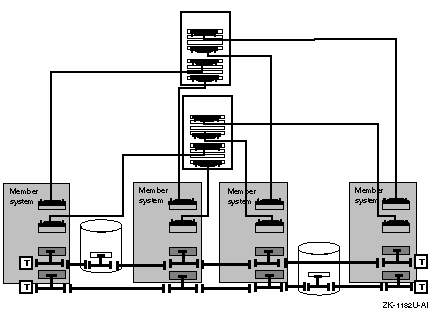
Figure 6-20 shows a Production Server hardware configuration with two ASEs. Each ASE consists of two member systems, each connected to two shared SCSI buses. Each member system also has redundant MEMORY CHANNEL interconnects in a standard hub configuration (including MEMORY CHANNEL hubs). Because this configuration requires four PCI slots, it is not supported on AlphaServer 2000 or 2100 systems.